12 Input/Output (I/O)
Before i discuss input/output proper, i’m going to show you how to do something that YOU SHOULD DEFINITELY NEVER EVER DO. So, Apple has this thing that’s part of Mac OS (since El Capitan) called System Integrity Protection, or SIP. It’s very useful for protecting your Mac from malicious hackers because it limits what can be done by even by the most priliveged user. However, it also makes trying to figure out how your computer works kind of a bummer, because it limits what can be done even by the most privileged user. In particular, it makes it nearly impossible to trace system calls.
Keeping in mind that YOU SHOULD DEFINITELY NEVER EVER DISABLE SIP, here’s how you do it. First, you need to boot into Recovery Mode. If you forgot how to boot into Recovery Mode and you Google it, you’ll probably find something about how you need to restart the computer and then press ⌘-R. After you try this 3 or 4 times you’ll figure out that it doesn’t work on an M2 Mac. On the Apple silicon Macbooks, the trick is to hold down the power button/Touch ID until it says something about “Loading Options”. In Recovery mode one of the menus will have an option to start a Terminal. At the terminal command line, type:
csrutil disableYou’ll get a message that says something like “Are you sure you want hackers to destroy your computer, steal your identity, and use your credit cards to buy weapons on the dark web?”, to which you answer “Y”. Reboot. But not really, because you’re not really doing this.
My reason for doing this is to trace system calls using dtruss, which is sort of like strace on Linux. Suppose for example you had this very simple C program that reads from standard input:
#include <stdio.h>
#include <unistd.h>

int main(int argc, const char * argv[]) {
    char buffer[10];
    read(STDIN_FILENO, buffer, 10);

    return 0;
}
If you compile this and run it with dtruss you’ll see something like this:
clang --debug readstdin.c
sudo dtruss ./a.out

...
proc_info(0x2, 0x8D0, 0xD)       = 64 0
csops_audittoken(0x8D0, 0x10, 0x16B565F20)       = 0 0
sysctl([unknown, 3, 0, 0, 0, 0] (2), 0x16B566278, 0x16B566270, 0x196A5ED3D, 0x15)        = 0 0
sysctl([CTL_KERN, 138, 0, 0, 0, 0] (2), 0x16B566308, 0x16B566300, 0x0, 0x0)      = 0 0
csops(0x8D0, 0x0, 0x16B5663AC)       = 0 0
mprotect(0x104CA8000, 0x40000, 0x3)      = 0 0
read me
read(0x0, "read me\n\0", 0xA)        = 8 0
where i’ve dropped a bunch of initial system calls. You can see that it eventually calls the read() system call in the XNU kernel. We can sort of see this in the lldb debugger too. If we stop at the line making the read() call to the standard C library, then step instruction by instruction, we eventually end up here:
    frame #0: 0x00000001935f19ac libsystem_kernel.dylib`read
libsystem_kernel.dylib`read:
->  0x1935f19ac <+0>:  mov    x16, #0x3
    0x1935f19b0 <+4>:  svc    #0x80
Basically this code loads the system call number for read() (0x3) into the X16 register, then invokes the SVC instruction. As mentioned earlier, this instruction jumps to code in the kernel (to a function called handle_svc()). Note that the X1 and X2 registers already contain the number of characters to read and the buffer address respectively.
Now let’s try a slightly more complicated program that reads from a file:
#include <stdio.h>
#include <unistd.h>

int main(int argc, const char * argv[]) {
    FILE *fptr;

    fptr = fopen("foo.txt", "r");

    char buffer[10];
    fgets(buffer, 10, fptr);

    printf("%s", buffer);
    fclose(fptr);

}
echo "and the bunnymen" > foo.txt
clang --debug readfile.c
sudo dtruss ./a.out
...
mprotect(0x1032E8000, 0x40000, 0x3) = 0 0
getrlimit(0x1008, 0x16CF27498, 0x0) = 0 0
open_nocancel("foo.txt\0", 0x0, 0x0) = 3 0
fstat64(0x3, 0x16CF27470, 0x0) = 0 0
read_nocancel(0x3, "and the bunnymen\n\0", 0x1000) = 17 0
fstat64(0x1, 0x16CF273B0, 0x0) = 0 0
ioctl(0x1, 0x4004667A, 0x16CF273FC) = 0 0
lseek(0x3, 0xFFFFFFFFFFFFFFF8, 0x1) = 9 0
close_nocancel(0x3) = 0 0
write_nocancel(0x1, "and the b\0", 0x9) = 9 0As you can see this invokes a series of system calls, open_nocancel(), read_nocancel(), ioctl(), etc.
Anyway, the point i’m trying to make here is that input/out usually goes through the OS kernel, or at least that’s what i’m used to. In Linux for example, the device drivers run in kernel space because they need access to privileged things. As i currently understand it, MacOS basically did that too up until Version 10.15, using what are called kernel extensions or kexts, and an API called IOKit. Then they introduced something called System Extensions and a framework called DriverKit, which lets you make extensions including device drivers that run in user space. I can see some of these on my machine:
$ ps -eo user,command | grep DriverExtensions

_driverkit       /System/Library/DriverExtensions/com.apple.DriverKit-IOUserDockChannelSerial.dext/com.apple.DriverKit-IOUserDockChannelSerial com.apple.IOUserDockChannelSerial 0x100000bc0 com.apple.DriverKit-IOUserDockChannelSerial
_driverkit       /System/Library/DriverExtensions/com.apple.AppleUserHIDDrivers.dext/com.apple.AppleUserHIDDrivers com.apple.driverkit.AppleUserHIDDrivers 0x100000bc1 com.apple.AppleUserHIDDrivers
_driverkit       /System/Library/DriverExtensions/IOUserBluetoothSerialDriver.dext/IOUserBluetoothSerialDriver com.apple.IOUserBluetoothSerialDriver 0x100000ce9 com.apple.IOUserBluetoothSerialDriver
However, it seems like they’re still in the process of transitioning drivers because many seem to still be kexts.
I/O is surprisingly tricky, probably because there’s a lot of abstraction necessary to make every possible device fit into the same model. The range of devices goes from input-only things like keyboards and mice, output-only things like displays and printers, and read/write devices like disks and SSDs. There’s been a lot of effort put into standardization of I/O interfaces and protocols to make matters a little simpler (eg, USB 3, PCIe, SATA), but it’s still hard to handle everything.
Consider the “System Report” that you can generate from the “About This Mac” view:
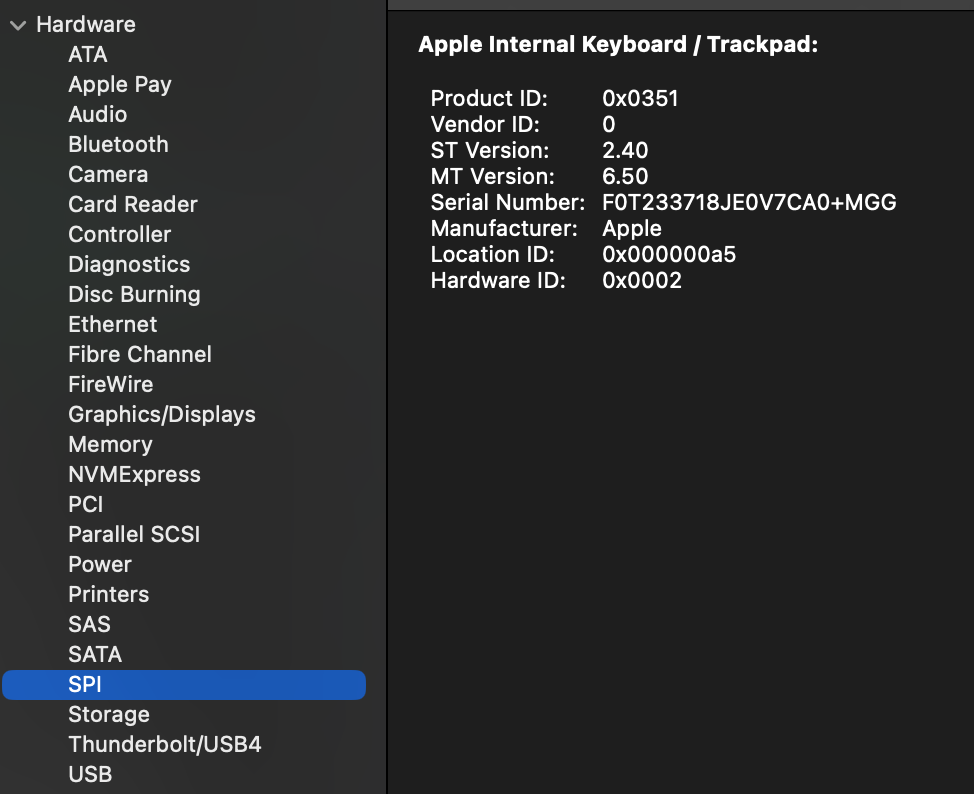
The possible device include Bluetooth, Ethernet, PCI, NVME, SATA, USB4, etc. Selected here is SPI, the Serial Peripheral Interface, a sort of standard synchronous serial protocol, which you can see covers the internal keyboard/trackpad of my laptop.
Mac OS also has a tool called ioreg, which displays information in the IOKit registry. This produces a huge amount of information, so unless you already know the name of some class in the hierarchy of IOKit drivers, you might have to do searching. For example if i get everything in the IOService plane, i can search for information about a particular device.
ioreg -l -p IOService > ioservIn that file if i search for that serial number in the output of the ioreg command, i find this structure:
AppleDeviceManagementHIDEventService  <class AppleDeviceManagementHIDEventService, id 0x1000008db, registered, matched, active, busy 0 (0 ms), retain 9>
    | |   |         |       | {
    | |   |         |       |   "IOClass" = "AppleDeviceManagementHIDEventService"
    | |   |         |       |   "HardwareID" = 2
    | |   |         |       |   "Transport" = "FIFO"
    | |   |         |       |   "IOPersonalityPublisher" = "com.apple.driver.AppleTopCaseDriverV2"
    | |   |         |       |   "IOMatchedAtBoot" = Yes
    | |   |         |       |   "Built-In" = Yes
    | |   |         |       |   "Product" = "Apple Internal Keyboard / Trackpad"
    | |   |         |       |   "IOProviderClass" = "IOHIDInterface"
    | |   |         |       |   "Manufacturer" = "Apple"
    | |   |         |       |   "WakeReason" = "Host (0x01)"
    | |   |         |       |   "DeviceUsagePairs" = ({"DeviceUsagePage"=65280,"DeviceUsage"=11})
    | |   |         |       |   "IOProbeScore" = 2200
    | |   |         |       |   "VendorIDSource" = 0
    | |   |         |       |   "HIDServiceSupport" = Yes
    | |   |         |       |   "CountryCode" = 0
    | |   |         |       |   "CFBundleIdentifierKernel" = "com.apple.driver.AppleTopCaseHIDEventDriver"
    | |   |         |       |   "VendorID" = 0
    | |   |         |       |   "VersionNumber" = 0
    | |   |         |       |   "IOMatchCategory" = "IODefaultMatchCategory"
    | |   |         |       |   "CFBundleIdentifier" = "com.apple.driver.AppleTopCaseHIDEventDriver"
...
If i look for a driver being loaded in the system logs, i see this from a recent reboot:
(base) $ log show --style syslog | grep -i kernelmanagerd | grep -i topcase

2024-09-12 10:11:06.002116-0700  localhost kernelmanagerd[61]: Received kext load notification: com.apple.driver.AppleTopCaseHIDEventDriver
This indicates that kernelmanagerd, which is the program used to load kernel extensions is loading the driver for the internal keyboard and trackpad.
Consider the simple program above that reads from standard input. In my case, the “standard input” is the keyboard on my Macbook, which is handled by the driver discussed above. A lot has to happen before i can even start typing stuff, and the kernel has to know that this particular device is the one that maps to file descriptor 0, unless i plug in a USB keyboard or pair a Bluetooth keyboard and now two devices can send data characters to stdin.
Since MacOS/Darwin/XNU is sort of Unix it follows the general “everything is a file” philosophy of Unix to some extent. You can see this if you look in the /dev directory, which is where Unix-like systems keeps file system entities that correspond to devices. You’ll see a bunch of stuff in there, most of which are terminal (tty) or pseudo-terminal (pty) entries. There are also files corresponding to disk devices, but we’ll cover those more in the next episode on files.